How to Use the Semrush API Without Writing Code


Most people who ask us about the Semrush API assume it is a developer thing and stop there. They picture installing software and writing Python.
The Semrush API on GroupbuySEO is a web address. You paste it into the same browser bar you use for everything else, press Enter, and the data appears on screen. There is nothing to download and nothing to install. If you can paste a link, you can use it, and you can do it on your phone.
This guide walks through it from a standing start: buying credits, getting your key, pulling your first numbers, and running a PLA Research report on a competitor's Google Shopping ads. Every example below is real output from the live API, copied exactly as it came back.
What you get, before we start
This is one link, pasted into a browser, asking for eBay's top organic keywords:
Keyword;Position;Previous Position;Search Volume;Keyword Difficulty;CPC;URL;Traffic;Traffic Cost
ebay;1;1;30400000;93;1.31;https://www.ebay.com/;24320000;31859200
ebay usa;1;1;301000;92;0.74;https://www.ebay.com/;240800;178192
evay;1;1;135000;87;1.31;https://www.ebay.com/;108000;141480
That is the raw data behind a Semrush report. Same numbers, no dashboard around them. You can read it in the browser, paste it into a spreadsheet, or hand it to a tool that does something clever with it.
The semicolons look odd if you have not seen a CSV before. They are just column separators. We cover getting this into Google Sheets or Excel further down, and it takes about twenty seconds.
Before your first request
Two things, and both live in your GroupbuySEO dashboard:
- Credits. Every request spends a small number of them. There is no free allowance, so this has to come first.
- An API key. A long string of letters and numbers that identifies you. You create it once and reuse it forever.
You do not need a Semrush account of your own, and you do not need to install anything. Budget five minutes.
Buy credits
Go to Dashboard → API Access → Credits and choose an amount. Semrush credits start at 50,000, and 50,000 costs $3.00.
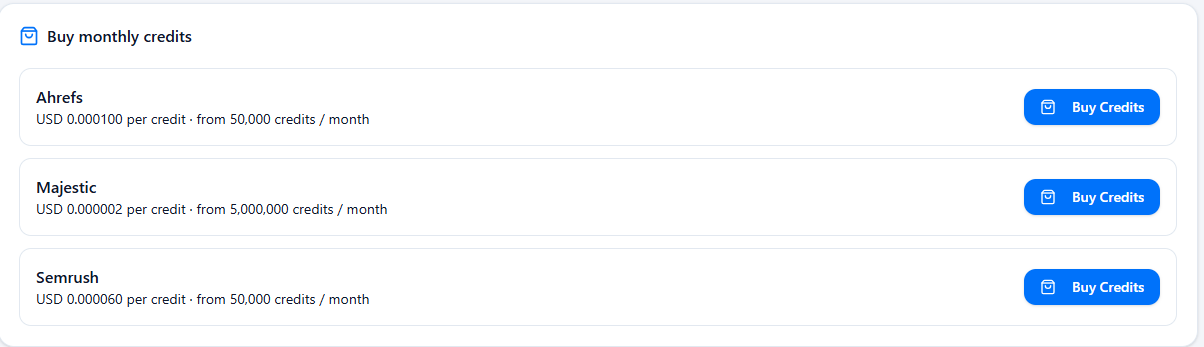
That $3.00 is a minimum purchase rather than an entry price, and it buys more than the number suggests. Most Semrush reports cost 10 credits per row, so 50,000 credits is five thousand rows of data, and a ten-row keyword pull works out at around $0.006. You are unlikely to exhaust a first block by experimenting.
Credits are a one-time purchase. You buy a block, and whatever you have not spent by the end of its billing period expires rather than carrying over. Nothing recurs: there is no subscription to cancel and no automatic top-up. When you run out, you buy again.
The rate per credit is shown on the credits page itself, which is the figure to trust if it ever differs from the one above.
Create your API key
Go to Dashboard → API Access → Keys and press Create Key. Give it a name, then tick Semrush under Products. That box is easy to miss and it matters: a key with nothing ticked is valid but cannot call anything, which produces a confusing error on your very first request.
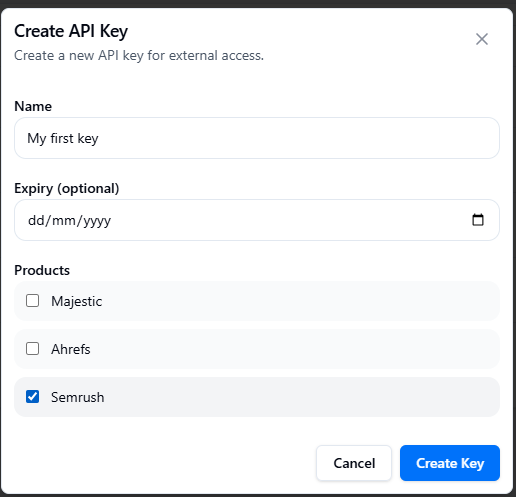
Leave the expiry date blank unless you want the key to stop working on a set date. Press Create Key and you will get something shaped like this:
gbs_sk_live_xxxxxxxxxxxxxxxxxxxxxxxxxxxxxxxxxxxxxxxxxxxxxxxxxxxxxxxxxxxxxxxxYours will have 64 characters after the gbs_sk_live_ prefix, all of them hex. That is worth knowing because a key truncated in a copy-paste is one of the commonest first-request failures, and counting the tail is the quickest way to rule it out.
Copy it somewhere safe. Treat it exactly like a password: anyone who has that string can spend your credits. Do not put it in a public spreadsheet, a screenshot, or a support message.
If you ever think it has leaked, revoke it on the same page and make a new one. Nothing else breaks when you do.
Your first result
Take this link, replace YOUR_KEY with the key you just made, and paste the whole thing into your browser:
https://api-semrush.groupbuyseo.org/?type=domain_rank&key=YOUR_KEY&domain=ebay.com&database=usPress Enter. You should see one line of data:
Domain;Rank;Organic Keywords;Organic Traffic;Organic Cost;Adwords Keywords;Adwords Traffic;Adwords Cost
ebay.com;29;49519075;83582138;60220449;9006;165544;86772
That is eBay's overall Semrush profile: global rank 29, roughly 49.5 million organic keywords and 83.5 million monthly organic visits.
If you got a line beginning ERROR instead, skip to the troubleshooting section near the end; a handful of causes account for nearly every failed first request, and none of them cost you credits.
Make it about your own site
Now change ebay.com to a domain you care about, and change type to ask a different question. This one returns the keywords a site ranks for, strongest first:
https://api-semrush.groupbuyseo.org/?type=domain_organic&key=YOUR_KEY&domain=yoursite.com&database=us&display_limit=10&display_sort=tr_descTwo new parameters there, and you will reuse both constantly:
display_limit=10: how many rows you want back. This also controls what you spend, because most reports are billed per row returned. Start small.database=us: which country's search results. Swap inuk,de,in,ruand so on.
Everything else in this guide is the same pattern with a different type value.
Countries, and the mistake that costs 1,400 credits
database picks which country's search results you are asking about. Leave it as us while you are learning, then swap in uk, de, in, ru, br or any of the other codes Semrush supports.
Two things about it will save you credits. First, database=all is not a thing; you get ERROR 50 :: NOTHING FOUND rather than every country. Second, if you leave database off a domain overview entirely, you do not get a default country, you get roughly 140 rows, one per regional database. At 10 credits a row that is a 1,400-credit request when you wanted a 10-credit one, and it is the single most expensive beginner mistake here.
So: always name the country, unless you want every country at once and have budgeted for it.
Asking for fewer columns
Most reports return every column they have. Add export_columns and you get only the ones you name, which makes the output far easier to read in a browser:
https://api-semrush.groupbuyseo.org/?type=domain_organic&key=YOUR_KEY&domain=etsy.com&database=us&display_limit=5&export_columns=Ph,Po,NqThose three codes are keyword, position and search volume. Semrush uses short codes like this throughout, and the full list of which codes each report accepts is in the documentation on your dashboard. Narrowing the columns does not reduce what you are charged, since billing is per row, but it does make the difference between a readable screen and a wall of semicolons.
Research a keyword instead of a domain
Swap domain for phrase and you are asking about a search term rather than a site:
https://api-semrush.groupbuyseo.org/?type=phrase_this&key=YOUR_KEY&phrase=running+shoes&database=usKeyword;Search Volume;CPC;Competition;Number of Results
running shoes;246000;0.88;1;238246,000 searches a month in the US, 88 cents a click, competition at the top of the scale. Spaces in a search term become + in the link, which is the one piece of punctuation that trips people up.
If you have a list of terms to check, type=phrase_these takes up to 100 at once separated by semicolons, which is far cheaper than running them one at a time.
Related keywords and backlinks
Three more that cover most of what people ask for:
phrase_related: keywords semantically close to the one you gave, for expanding a content plan. 40 credits per row.backlinks_overview: a summary of a domain's backlink profile. 40 credits per request, so the row count does not change the price.backlinks_refdomains: the domains linking to a site, one per row. 40 credits per row, so keepdisplay_limitlow.
They take the same key, database and display_limit parameters as everything above. There are 82 report types in total, covering domains, keywords, subdomains, subfolders, individual URLs, backlinks and Trends data; the handful in this guide are the ones people reach for first. The full list, with the exact columns each one returns, is on the Semrush page under API Access in your dashboard.
PLA Research: a competitor's Google Shopping ads
PLA stands for Product Listing Ads, the product results with photos and prices that sit at the top of Google when someone searches to buy something. PLA Research shows you which of those a domain is running.
If you sell anything online, this is usually the most useful part of the API. There are three reports.
Which products a domain advertises
https://api-semrush.groupbuyseo.org/?type=domain_shopping&key=YOUR_KEY&domain=ebay.com&database=us&display_limit=3Real output:
Keyword;Position;Previous Position;Position Difference;Search Volume;Shop Name;Url;Title;Product Price;Timestamp
mexico jersey;7;7;0;165000;eBay;http://ebay.com/;Mexico 2026-2027 Jersey Sports Shirt World Cup Home And Away Shirt New;34.8;1789341368
You get the search term, the ad's position, monthly search volume, the product title and the price being advertised. That is a competitor's shopping strategy laid out in a list.
Their individual ads
https://api-semrush.groupbuyseo.org/?type=domain_shopping_unique&key=YOUR_KEY&domain=ebay.com&database=us&display_limit=3Title;Product Price;Url;Number of Keywords;Ad id
Basic Strategy Card For Blackjack;24.99;http://ebay.com/;3;13693257571595069047Each distinct product ad, its price, and how many keywords it shows up for. Useful for spotting which products someone is pushing hardest.
Who they compete against
https://api-semrush.groupbuyseo.org/?type=domain_shopping_shopping&key=YOUR_KEY&domain=ebay.com&database=us&display_limit=3Domain;Competitor Relevance;Common Keywords;Adwords Keywords;Adwords Traffic;Adwords Cost;Organic Keywords;PLA keywords
etsy.com;0.12;299;2214;875989;25979;20826695;2589The domains bidding on the same shopping keywords, and how much overlap there is. Change the domain to your own and you have your shopping competitor list.
A competitor audit in three links
Here is what the pieces above look like used together. Pick a competitor, then run three requests and read them in order. The whole thing costs a few hundred credits and takes about two minutes.
One: how big are they? Start with the overview, so you know whether the rest of the numbers are worth your attention.
https://api-semrush.groupbuyseo.org/?type=domain_rank&key=YOUR_KEY&domain=competitor.com&database=usOne row, 10 credits. If their organic traffic is a tenth of yours, you can stop there.
Two: what are they ranking for? Sorted by traffic, so the first rows are the pages actually earning them visits.
https://api-semrush.groupbuyseo.org/?type=domain_organic&key=YOUR_KEY&domain=competitor.com&database=us&display_limit=50&display_sort=tr_descFifty rows at 10 credits each is 500 credits. Paste it into a spreadsheet, sort by traffic, and look for terms you have no page for.
Three: what are they paying to advertise? If they sell products, the shopping report shows what they are pushing and at what price.
https://api-semrush.groupbuyseo.org/?type=domain_shopping&key=YOUR_KEY&domain=competitor.com&database=us&display_limit=20&display_sort=nq_descTwenty rows at 30 credits is 600 credits. Sorting by nq_desc puts the highest-volume search terms first, which is usually where the budget is going.
Change the domain and run the same three links for the next competitor. Repeating a fixed set of links is something the API does better than clicking through an interface, which is the main argument for it.
Getting it into a spreadsheet
Reading semicolons in a browser gets old fast. The quickest route into Google Sheets needs no formulas at all:
- In the browser tab showing your data, select everything and copy it.
- Paste into cell A1 of a blank sheet. It will all land in one column, which is expected.
- With that column selected, go to Data → Split text to columns, then pick Semicolon as the separator.
You get proper columns with sortable headers. Excel has the same feature under Data → Text to Columns.
There is a live version, =IMPORTDATA("your-url-here", ";"), which refreshes by itself. It works, but think before you use it: the formula contains your API key, so anyone you share that sheet with can spend your credits. For anything you might share, copy and paste instead.
What the reports cost
Pricing is per row returned, not per request, which is why display_limit matters so much. A ten-row pull costs a tenth of a hundred-row pull.
| Report | type | Credits per row |
|---|---|---|
| Domain overview | domain_rank | 10 |
| Organic keywords | domain_organic | 10 |
| Keyword overview | phrase_this | 10 |
| PLA positions | domain_shopping | 30 |
| PLA ads | domain_shopping_unique | 60 |
| PLA competitors | domain_shopping_shopping | 60 |
So a 100-row organic keyword pull is about 1,000 credits and a 10-row PLA report about 300, or six cents and two cents at the rate above. Those are the numbers worth holding on to, because they are what make a habit affordable: auditing twenty competitors every Monday is a rounding error, and it is only a mistake with database that turns a cheap request into an expensive one.
You can watch the balance drop under Dashboard → API Access → Usage, which lists every request you have made and what it cost. Two other limits are worth knowing before you build anything on top: display_limit is capped at 1,000 rows, and one key can have three requests in flight at once.
If you do write code
Everything above works from a terminal without changes, because it is an ordinary GET request:
curl "https://api-semrush.groupbuyseo.org/?type=domain_organic&key=YOUR_KEY&domain=wayfair.com&database=us&display_limit=10"And if you use an AI coding assistant, one command teaches it the entire API, every endpoint and parameter and what each one costs:
npx skills add https://skills.groupbuyseo.org --skill semrush-apiAfter that you can ask Claude Code, Codex or Cursor for Semrush data in plain English and it will build the right request itself. Full endpoint documentation also sits inside the dashboard, on the Semrush product page under API Access.
When something goes wrong
The errors come back as a line of plain text rather than a tidy message, so here is what each one means.
ERROR 132 :: API UNITS BALANCE IS ZERO means you are out of credits. Top up on the credits page and the same link will work.
ERROR 50 :: NOTHING FOUND means the request was understood and matched nothing. Usually a parameter Semrush does not accept, and database=all is the common one. It can also mean the domain genuinely has no data in that country; try a larger, better-known domain to tell the two apart.
ERROR 120 :: WRONG KEY - ID PAIR is not about your key at all. It is our upstream connection to Semrush, the gateway now rotates away from a key that returns it, and you should rarely see it. If it persists, it is a support ticket rather than something to debug.
Nothing useful at all, on your very first request. Check that you ticked Semrush when you created the key. A key with no product ticked is valid and cannot call anything, which is the most confusing way this can fail.
Everything landing in one spreadsheet column. You skipped the split step. Data → Split text to columns → Semicolon.
Fewer rows than you asked for. display_limit is a ceiling, not a quantity. A small site may only have nine keywords in that country's database, so nine is what comes back, and nine is what you are charged for. The ceiling itself tops out at 1,000 rows per request.
None of these cost you anything. A failed request is charged zero credits, which is what makes trying things the cheapest way to learn the API.
Is the API the right choice for you?
The API is for pulling data out in bulk: hundreds of domains, scheduled reports, feeding a spreadsheet or a script. Checking the same twenty competitors every Monday is the sort of job it does well, because the twenty links never change. It has no interface, so it is a poor fit for browsing and exploring.
If you want to click around Semrush the normal way, shared access to the tool itself is the better buy. Semrush is $5/month standalone through us, or included in the Ultimate Plan at $49/month with 91 tools. Bought directly from Semrush, the entry tier is $117.33/mo and the Advanced tier $455.67/mo on annual billing (semrush.com/prices, checked September 2026).
Plenty of people use both: the interface for exploring, the API for the bulk work. If you are still weighing Semrush against the obvious alternative, our Semrush vs Ahrefs comparison goes through where each one wins.
Frequently asked questions
Do I need to know how to code to use the Semrush API?
No. Every example in this guide is a web address you paste into a browser. Code is optional and only becomes useful when you want to automate something you are already doing by hand.
Do I need my own Semrush subscription?
No. Access runs through GroupbuySEO, so you buy credits from us and use your own API key. There is no Semrush account to create.
What is PLA Research and why would I use it?
PLA means Product Listing Ads, the shopping results with pictures and prices at the top of Google. PLA Research shows which products a domain advertises there, at what price, and which other retailers it competes with. It is mostly useful if you sell physical products.
How much does one report cost?
Between 10 and 60 credits per row returned, depending on the report. In money, a ten-row keyword pull is under a cent. Because billing is per row, adding display_limit=10 keeps the cost small while you are learning, and failed requests cost nothing at all.
What does it cost to start?
$3.00, which buys the 50,000-credit minimum for Semrush. That is a one-time purchase rather than a monthly fee, and it covers roughly five thousand rows of data. The current rate per credit is shown on the credits page in your dashboard.
Can I use this on my phone?
Yes. The requests are ordinary web links, so tapping one in your phone browser shows the data the same way it does on a desktop. Getting it into a spreadsheet is easier on a computer.
Is my API key safe to share with a colleague?
Treat it like a password. Anyone holding the key can spend your credits. Share the results rather than the key, and if you think it has been exposed, revoke it on the Keys page and create a new one.
What happens to credits I do not use?
They expire at the end of the billing period they belong to rather than rolling over, so the balance does not accumulate indefinitely. Nothing renews on its own either, so running out is the prompt to buy again rather than something that happens quietly in the background.