Figma Review 2026: Professional Plan Cost and a Cheaper Way to Get It
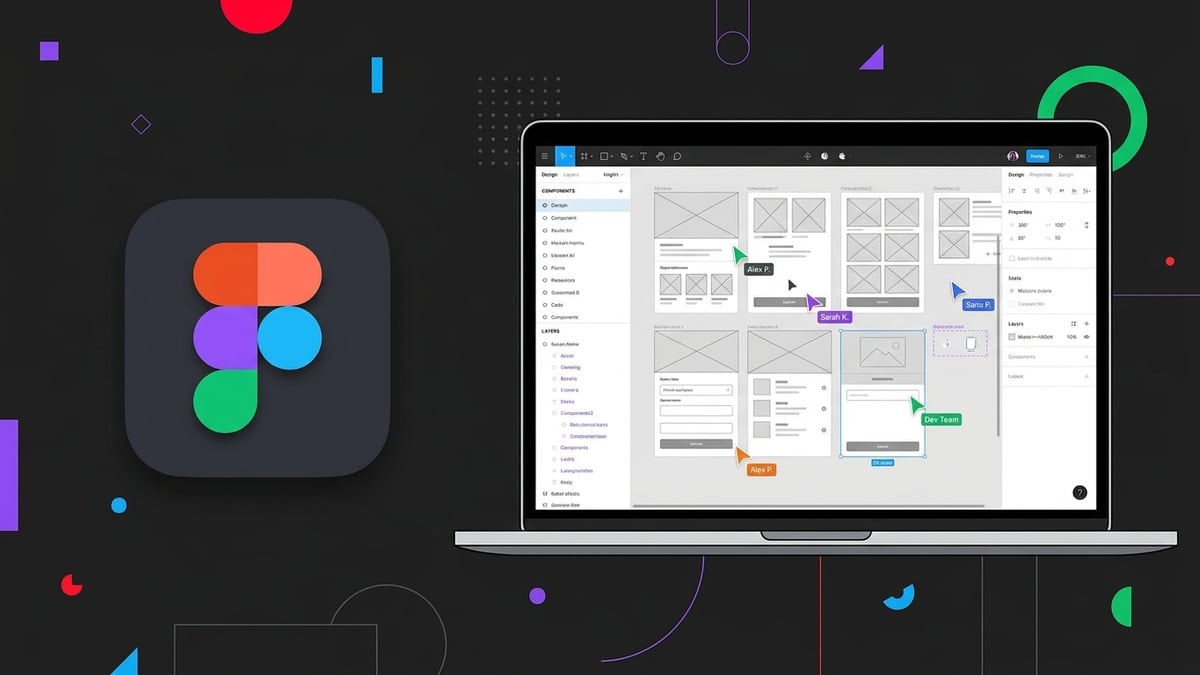
Figma is the browser-based design tool most product teams work in. Interface design, prototyping, FigJam whiteboards and, more recently, slides all live in the same file, and everyone on the team edits at the same time. This review is written for freelancers, small agencies and solo product designers who have outgrown the Starter tier and want to know whether the Professional seat is worth paying for every month, and what it costs once you add up the seats.
GroupbuySEO sells shared access to paid tools, Figma included, so the pricing sections below come from a seller. We show Figma's own list prices first, then what the same tier costs through us, and we spell out what you give up in exchange so you can decide with the trade-off in front of you.
Quick verdict
- Figma Professional is for anyone doing regular client or product design work who keeps running into the Starter tier's cap of three design files and its 30-day version history (figma.com/pricing, checked 3 Sep 2026). If you open Figma a couple of times a month for a quick mockup, Starter is probably still enough.
- A Professional full seat is $16 a month on monthly billing at figma.com/pricing, checked 3 Sep 2026. Through GroupbuySEO the same Professional tier is $5 a month standalone, or included in the Ultimate Plan at $49 a month alongside 90 other tools (catalogue synced 19 Sep 2026).
- The catch is that our access is a shared paid account. Your files live in a shared workspace, it is not your own Figma team, and it is the wrong choice if you need to keep a company design system under its own identity or invite clients into a workspace you control.
What Figma is

Figma started as a vector design tool that ran in a browser tab instead of a desktop app, and that one decision still explains most of what makes it different. There is nothing to install and no file sitting on one person's laptop, because the file is the URL. Two designers can move the same button at the same time and watch each other's cursors do it. A developer can open the same link and read the spacing without asking anyone to export anything.
The product has grown a lot around that core. FigJam is the whiteboard for sticky-note sessions and flow diagrams. Dev Mode is the read-only view developers use for handoff. Figma Slides is the newest addition and lets a team present straight from the design file. All of it sits under one login and one billing relationship, which is convenient right up until you look at the per-seat price.
The Starter tier costs nothing, and it is enough to learn the tool. Where it runs out is easy to describe, because the limits are plain numbers. According to figma.com/pricing, checked 3 Sep 2026, Starter allows three design files and three FigJam boards, and keeps 30 days of version history. Professional removes both caps and keeps every version. It also adds the features that turn Figma from a drawing tool into a system.
Unlimited files, projects and version history
Three files (the Starter cap at figma.com/pricing, checked 3 Sep 2026) sounds like plenty until you have three clients. Most working designers hit the cap in the first week, then start deleting and re-uploading files to stay under it, which is the point at which the Starter tier has stopped being worth the saving. Professional lifts the file and project caps entirely. The version history change matters just as much. Starter throws away anything older than 30 days and Professional keeps everything (figma.com/pricing, checked 3 Sep 2026), which is the difference between "here is the version you approved in March" and an apology.
Team libraries
This is the Professional feature that makes a design system real. You publish components, colour styles, text styles and variables from one library file, then use them in every other file. Change the primary button in the library and every instance across every file gets the update. Without libraries you are copying and pasting components between files and hoping nobody edits one of the copies.
Dev Mode and prototyping
Dev Mode gives developers a view of the file built for inspection: measurements, spacing, colour values and code snippets for the platform they are building on. It replaces the spec document and the "what is the padding on this" message. Prototyping lives on the design side and lets you wire screens together with transitions and advanced interactions so a client or a test participant can click through a flow before anyone writes code.
Audio and private plugins
Regular users end up leaning on two smaller Professional features as well. Audio lets you talk inside a file without opening a separate call, which is handy for a quick review. Private plugins let a team load plugins that are not on the public marketplace, which is how a lot of internal tooling gets built.
Above Professional, Figma sells Organization and Enterprise tiers that add SSO, design-system analytics and admin controls. Those tiers are aimed at a different buyer, usually a company with an IT department, and this review does not spend much time on them.
What Figma costs if you buy it directly
Figma prices per seat, and the seat type depends on what the person does in the file. The table below lists the paid seats as shown at figma.com/pricing, checked 3 Sep 2026.
| Plan | Price | Who it is for |
|---|---|---|
| Professional, full seat | $16/mo | Designers; monthly billing |
| Professional, dev seat | $12/mo | Developers inspecting designs |
| Organization, full seat | $55/mo | Annual billing; SSO, design systems |
| Enterprise, full seat | $90/mo | Annual billing; large orgs |
Source for every figure above: figma.com/pricing, checked 3 Sep 2026. Figma also sells a $3 Collab seat for people who only need to comment, and a Starter tier at no cost with the file limits described earlier (same source and date).
Read the table as a per-person cost before you read it as "$16 a month" (figma.com/pricing, checked 3 Sep 2026). The full seat price is what a designer pays. Anyone who needs to edit a design file needs a full seat, so a two-person design studio is paying for two of them. A developer who only inspects gets away with the cheaper dev seat, and someone who only leaves comments can sit on a Collab seat, but the moment either of them needs to move a rectangle they get bumped to a full seat.
Billing period matters too. The $16 full-seat figure is monthly billing (figma.com/pricing, checked 3 Sep 2026). Organization and Enterprise are quoted on annual billing, which means a commitment up front. If you are a freelancer whose project load swings from month to month, that difference matters more than the headline number.
The jump to Organization is steep. Going from Professional to Organization at $55 a month per full seat (figma.com/pricing, checked 3 Sep 2026) more than triples the seat cost, and what you get for it is mostly administrative: SSO, branching, centralised billing, analytics on how the design system is used. Very few freelancers or small agencies need any of that, which is why Professional is the tier most people reading this are deciding on.
Features that actually matter
Here are four workflows that Professional handles well and that Starter either cannot do or does badly. If none of these describe your week, you may not need the paid tier at all.
Building a component library once and using it across every client file
Say you run a small agency and every client site gets the same navigation pattern, the same form fields and the same set of buttons, restyled to their brand. On Starter you build those from scratch or copy them between files. On Professional you keep one library file per brand, publish it, and enable it in each project. When the client decides all their buttons need a larger radius, you change one master component and accept the update in each file. The time this saves scales with the number of files, which for an agency is the number of clients.
Variables push this further. You can define a colour as a variable, give it a light and dark value, and switch the whole file between modes with one toggle. Combined with a published library, you get a dark-mode version of a client's dashboard by switching the mode, with no second set of screens to maintain.
Handing off to a developer without writing a spec document
The old handoff was a PDF or a Zeplin export with red lines and pixel values. In Figma the handoff is the file itself. You share the link, the developer opens Dev Mode, clicks a component and sees the padding, the font, the colour token and a code snippet for CSS or the platform they are targeting. If you have used variables, they see the variable name instead of a bare hex value, which is what they want. When the design changes, the developer sees the change in the same file, with the version history showing what moved.
This only works if the developer has a way into the file. On a direct plan that means a dev seat at $12 a month each (figma.com/pricing, checked 3 Sep 2026) or a Collab seat for viewing and commenting. That is worth remembering when you total the cost of a project team.
Prototyping a flow you can put in front of a user
Static screens tell a client what a page looks like. A prototype tells them how it behaves, and the difference is the number of revision rounds you go through. Figma's prototyping lets you link frames with transitions, add overlays for modals, use smart animate between states and build interactions that respond to hover, drag and keyboard. You send a single link, the client opens it on their phone and taps through the flow. Feedback that would have taken a meeting arrives as comments pinned to the exact frame.
Professional does not gate prototyping itself, but the file cap on Starter makes it impractical to keep a prototype file per project, and unlimited version history means you can still open the exact version the user tested after you have kept editing for weeks.
Going back to the version a client approved three months ago
Version history is the feature nobody thinks about until the day they need it. A client signs off on a landing page in June. In September they say the layout has changed and it was not what they approved. On Starter, June is gone; the history only goes back 30 days (figma.com/pricing, checked 3 Sep 2026). On Professional you open the version history, scroll to the June snapshot, name it if you have not already, and restore or duplicate it. Named versions are worth the habit: every time a client approves something, save a version with the date and the word "approved" in it.
Who should buy it (and who should not)
Figma Professional is a good buy for a freelance product or web designer with more than a couple of active clients. The file cap alone forces the upgrade, and team libraries and version history are what make repeat client work efficient. It is also right for a small agency of two to five people who share a design system across projects, and for a solo founder building their own product who needs to hand designs to a contract developer.
Anyone learning UI design seriously should also be on it, because the job market expects Figma, and the Professional features (libraries, variables, Dev Mode) are exactly the ones interviewers ask about. Learning on Starter means learning without the parts that matter at work.
A marketer who mostly needs social graphics, ad creatives and the occasional one-pager will find a template-driven tool faster, and we cover the obvious one in the alternatives section. A company that needs SSO, audit logs or centralised admin is shopping for the Organization tier. And someone whose entire use of Figma is opening links other people send them needs a Collab seat or a view invite, which costs little or nothing.
One more group: people who have not yet hit a Starter limit. If you have three files, no client asking for old versions and no developer waiting on specs, keep the money. Upgrade when the limit bites, because it will be obvious when it does.
What you get through GroupbuySEO
Through GroupbuySEO, Figma Professional is $5 a month as a standalone tool (catalogue synced 19 Sep 2026). Against a full seat at $16 a month on Figma's own monthly billing (figma.com/pricing, checked 3 Sep 2026), that is less than a third of the list price for the same tier.
If you use more than one design or SEO tool, the Ultimate Plan is the other route. It is $49 a month and includes Figma along with 90 other tools, 91 in total (catalogue synced 19 Sep 2026), including Canva, Freepik, Envato Elements, Ahrefs, Semrush, ChatGPT and Claude. For a freelancer who currently pays separately for a design tool, a stock library and an AI writer, that plan usually costs less than any two of those subscriptions bought direct. Plan details are on the plans page, and the Figma tool page is at /tools/figma/.
You get your own login. This is a managed account with per-user isolation and fair-use limits, and the limits reset on a daily cycle. If you regularly run into the daily cap, the Ultimate Plan or an add-on gives you a higher one.
This is shared access to a paid Figma account. It is not your own Figma team. That makes it suitable for design work, and unsuitable for two specific things: storing a company's design system under its own identity, and inviting clients into a workspace you control as the owner. Files live in a shared workspace. If either of those two things is a requirement, buy a seat from Figma directly. If your need is the Professional feature set (unlimited files, full version history, libraries, Dev Mode) for your own design work, the shared account delivers it.
Figma alternatives
Figma has few direct competitors for interface design, so the alternatives below are for people who realised while reading this that they need graphics, templates or stock assets, and Figma is heavier than the job calls for. All three are in our catalogue.
| Tool | Best for | Through GroupbuySEO |
|---|---|---|
 Canva Canva | Social graphics, presentations, print, quick video | $5/mo standalone (catalogue synced 19 Sep 2026) |
 Freepik Freepik | Vectors, photos, mockups, icons, AI image generation | $5/mo standalone (catalogue synced 19 Sep 2026) |
 Envato Elements Envato Elements | Unlimited templates, footage, fonts and audio | $5/mo standalone (catalogue synced 19 Sep 2026) |
Canva is the tool for people who want a finished graphic in ten minutes. Its drag-and-drop editor and template library cover social posts, presentations, video and print, and Canva Pro adds the premium templates, the full stock library, brand kits and the one-click background remover. It is a poor substitute for Figma if you are designing an app, and a much better choice if you are designing an Instagram carousel. We reviewed it separately in our Canva Pro article.
Freepik is a stock-graphics library first: vectors, photos, PSD mockups, icons and templates, with AI image generation and editing added under the same subscription. Most designers use it alongside Figma. They pull a mockup or an icon set from Freepik and finish the work in Figma. The Premium tier removes the attribution requirement and the download limits of the entry tier.
Envato Elements is the unlimited-download stock library: templates, stock photos, video footage, fonts, graphics and audio under one subscription with no per-item licensing. Envato's own Core plan is €14.50 a month on annual billing, or €29 monthly, at elements.envato.com/pricing, checked 3 Sep 2026. If your work is presentations, video edits or marketing assets, this is where the money goes further.
How to buy Figma through GroupbuySEO
- Open the Figma tool page and choose either the standalone tool at $5 a month or the Ultimate Plan at $49 a month with 91 tools (catalogue synced 19 Sep 2026). If you also use Canva, Freepik or an SEO tool, the plan is usually the cheaper option. All plans are listed on the plans page.
- Check out. Prices are shown in your local currency where we support it, including India, Russia, Pakistan and Bangladesh, so you are not paying a US-dollar list price plus a card conversion fee on top.
- Log in with the credentials you receive and open Figma. Your access is under your own login with per-user isolation. Read the fair-use limits on the tool page before a heavy day so you know where the daily cap is.
Frequently asked questions
Is this a pirated or modified version of Figma?
No. It is a genuine paid Figma account, shared across users under fair-use limits. Nothing is patched or pirated, and Figma runs in the browser exactly as it does on a direct subscription.
What happens if I hit the daily limit?
The limit resets on a daily cycle, so you get it back the next day. If you hit it regularly, the Ultimate Plan or an add-on gives you a higher cap; both are on the plans page.
How is this different from buying a Figma login on Telegram?
Telegram sellers usually resell one login to hundreds of people. Figma detects that pattern and bans the account, often within days, and you have nobody to ask for your money back. Ours is a managed account with per-user isolation and a support team who answer when something breaks.
Does Figma have a tier that costs nothing?
Yes, the Starter tier, which allows three design files and three FigJam boards with 30 days of version history (figma.com/pricing, checked 3 Sep 2026). The features people pay for, such as unlimited files, full version history, team libraries and Dev Mode, are on Professional, which is the tier our shared access gives you.
Do you offer a student discount on Figma?
There is no separate student rate because the shared price of $5 a month (catalogue synced 19 Sep 2026) is already below what a student plan would cost, and it does not require a .edu email or an annual commitment. It is the paid Professional tier, month to month.
Is sharing a Figma account against the rules?
Reselling one password to a crowd is, and that is what the Telegram sellers do, which is why those accounts get banned. Ours is managed access with per-user isolation under fair-use limits. For anything that needs to be under your own identity, such as a company design system or a client-facing workspace you own, buy a seat directly from Figma.
Can I pay for Figma in my local currency?
Yes. Checkout shows prices in your region's currency where we support it, including India, Russia, Pakistan and Bangladesh, so you avoid paying a US-dollar list price plus a card conversion fee.
Do you offer a refund?
See our refund policy, and read it before you pay. That advice applies to any provider's site, ours included.